

Sales automation with n8n and Pipedrive
How we stopped our sales team from logging calls and messages by hand
- Industry
- IT services
- Geography
- Finland
- Type
- Internal automation
- Workflows
- Self-hosted n8n
- Inactive leads archived
- About 8,000
- Callback rule
- Task 2 business days after a missed call
- Technologies
Project overview
This is an internal project. Our business development team works with leads from LinkedIn outreach, cold calls and email. Each channel had its own tool, and the CRM held only the notes people remembered to add after a call.
Callbacks were missed, leads went quiet without anyone noticing, and old contacts filled the CRM and pushed us toward a more expensive Pipedrive plan.
What we did
We connected the sales tools to Pipedrive through our own self-hosted n8n instance. A small team built the workflows in short iterations, with the sales team setting priorities.
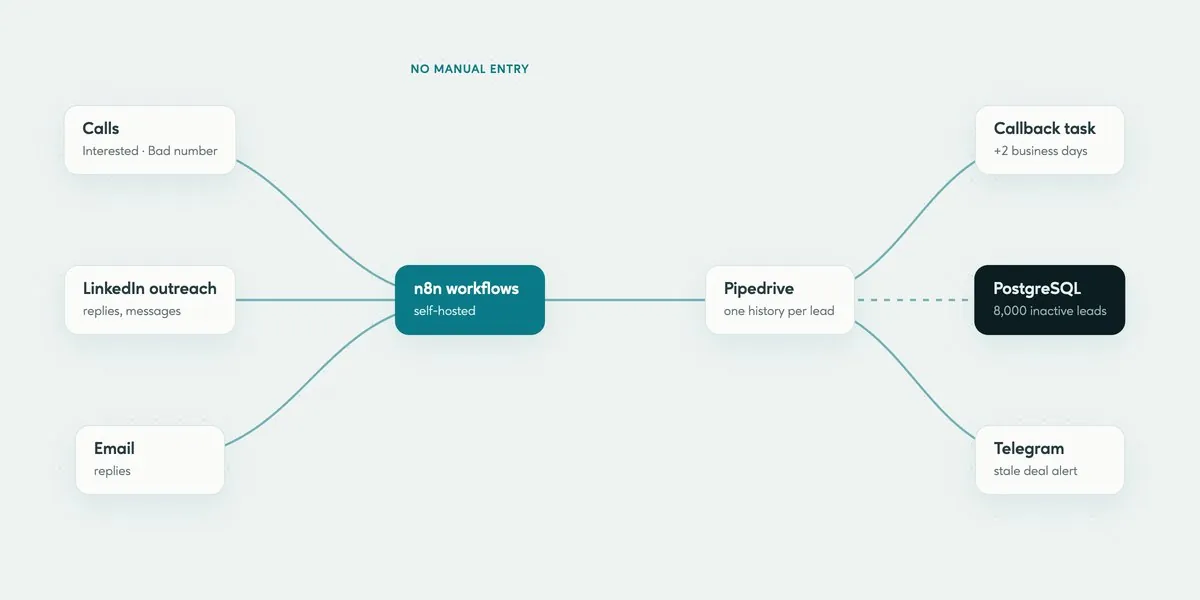
Calls: outcomes such as Interested, Not interested or Bad number go to Pipedrive automatically, and a missed call creates a callback task two business days later
LinkedIn: connection requests, replies and incoming messages are added to the lead in Pipedrive, so the whole conversation is in one place
Follow-ups: a lead with no reply after 15 days moves to nurture, and a follow-up task appears after 30 days
CRM cleanup: a monthly workflow archives leads with no activity, and about 8,000 inactive leads moved to a separate PostgreSQL database
Alerts: deals with no movement for 30 days are posted to the sales Telegram chat
Key results
Call outcomes and LinkedIn activity reach Pipedrive without manual entry
Every missed call becomes a callback task
About 8,000 inactive leads moved out of the CRM into PostgreSQL
Stale deals reported to the team chat instead of waiting for a pipeline review
Each sales manager now spends roughly 6 to 8 fewer hours a week on CRM data entry. Inactive leads live in our own database, so the CRM holds only contacts the team is working with, and the subscription stays on a smaller plan.
Next we are adding an LLM step that reads public company data and suggests an opening line for outreach. Client projects follow the same order: first the steps people repeat every day, then the tools they already pay for.
Frequently asked questions
Why use n8n instead of the CRM's built-in automations?
Built-in automations work inside one product. Our process spans the CRM, a phone system, LinkedIn, email and a team chat, and n8n reads from and writes to all of them in one workflow.
Why move inactive leads out of Pipedrive?
Pipedrive pricing and day-to-day work both depend on how many records the CRM holds. Archived leads stay in our own PostgreSQL database and come back to the CRM automatically if the contact shows new activity.
Find out what a project like this would cost
Tell us about your goals — we’ll outline the team, scope and timeline.
 Construction
Web application development for procurement platform
How outsourcing an MVP helped a fintech company secure its round
 Event management
Web platform for business networking
Event management SaaS platform developed from scratch
 Business Partnership
Video application from scratch
Video service for connection IT and Digital professionals with clients